
BobWeb Plugins

BobWeb Partial Payments for WooCommerce

This plugin adds a partial payments option in WooCommerce, both in the checkout and manually in the order, and displays the totals in the order overview screen.

€ 49

One time payment & money back guarantee
1 site license

Accept deposits at checkout and manage dated partial payments, balances and totals for WooCommerce orders.

Installing the Plugin

When you buy the plugin, you'll get a zip file and a license key. Below are the steps on how to install it.
Or watch this 45s video on YouTube.

  1. In your WordPress admin dashboard, go to plugins and click on add plugin.
  2. On the next screen, click on "Upload Plugin" at the top of that screen.
  3. Select the zip you received from your computer and upload it.
  4. Click on the Install Now button.
  5. Click on the Activate Plugin button.
  6. Click on the settings link under the plugin's name in the plugins screen.
  7. Paste in your license key and click on Activate License.

Save changes

When you change any setting, a Save changes button appears in the left bottom corner. If you click the arrow next to the save button, it will give you an overview of which settings will be saved. Click on any of the items to scroll to that specific setting. Click on the "Don't save changes" button to not save any of the changes.
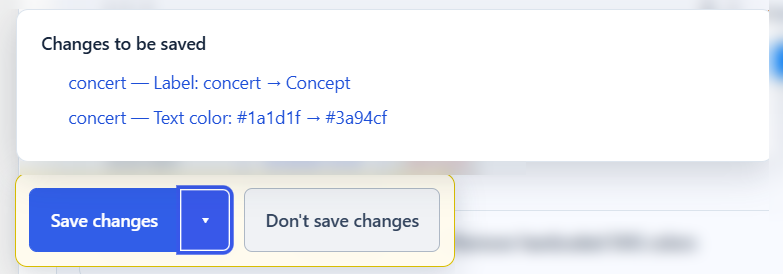
Save changes in BobWeb plugins

Deactivate your license

If you want to deactivate your license so you can use it on another site, you can do that at the bottom of the settings screen.

Deactivate the license for a BobWeb plugin so you can reuse it on another site

This plugin is available in the following languages

  • English
  • Nederlands
  • Deutsch
  • Français
  • Español
  • Italiano
  • Português
  • Polski
  • Dansk
  • Svenska
  • Norsk
  • Suomi
  • Čeština
  • Slovenčina
  • Magyar
  • Română
  • Ελληνικά
  • Türkçe
  • 日本語
  • 中文
  • One time payment

    no recurring costs, free updates

  • 30 days money back guarantee

    get a full refund if it's not for you

  • Great documentation

    video demo and written docs

Changelog

1.1.7 – 15-09-2026

  • Standardized the BobWeb header and framed logo styling.
  • Applied the shared light-yellow informational notice style to the per-product override message.

1.1.6 – 15-09-2026

  • Fixed identical installed and offered versions still appearing as an update when a stale rollback flag was present.
  • Forced rollbacks are now accepted only when the offered version is strictly lower than the installed version.
  • Added a final read-time sanitizer that removes stale same-version update entries already stored by WordPress.
  • Run the BobWeb update filter last to prevent an older cached response from surviving the refresh.

1.1.5 – 15-09-2026

  • Moved the per-product override information to the bottom of the Checkout deposit settings card.
  • Applied the standard BobWeb light-yellow background to the plugin header and override information box.

1.1.4 – 15-09-2026

  • Fixed stale update notices after updating through Dashboard → Updates.
  • Update checks now use WordPress' detected installed version instead of the version loaded earlier in the request.
  • Added a local version comparison and explicit stale-response cleanup while preserving forced rollbacks.
  • Clear the plugin-update cache and expired package verification data after completing an update.

1.1.3 – 15-09-2026

  • Rebuilt the classic-checkout payment choices so each radio button stays beside its label.
  • Added an editable checkout heading and extra spacing above the payment-choice block.
  • Documented the per-product overrides in the plugin settings.

1.1.2 – 15-09-2026

  • Removed all Total-column styling because that column may be hidden or replaced.
  • Let WooCommerce determine the intrinsic widths of Paid and Balance without width constraints.
  • Applied the requested visual separation only as left padding on Paid.

1.1.1 – 15-09-2026

  • Removed all forced widths and maximum widths from the Paid and Balance columns.
  • Restored native WooCommerce table sizing to prevent overlap when many order columns are present.
  • Retained safe spacing after Total without inflating the Paid column.

1.1.0 – 15-09-2026

  • Added per-product overrides for allowing or requiring full payment at checkout.
  • Added per-product percentage and fixed-amount deposit overrides.
  • Added mixed-cart calculation: ineligible products and non-product charges are paid in full while eligible products use their own deposit settings.
  • Fixed amounts are applied per ordered item and capped at the applicable product-line total.

1.0.7 – 15-09-2026

  • Changed Paid and Balance to content-sized table columns so they no longer reserve a fixed portion of the table.
  • Moved the extra separation to the Total column padding, keeping Paid and Balance internally consistent.

1.0.6 – 15-09-2026

  • Replaced the yellow totals separator with a dark-grey border.
  • Changed the Paid and Balance columns from character-based minimum sizing to equal enforced percentage widths.

1.0.5 – 15-09-2026

  • Replaced the payment delete link with an accessible circular red button and white cross.
  • Made the order payment interface inherit the surrounding WordPress font and font size.
  • Made the Paid and Balance order columns exactly the same width.

1.0.4 – 15-09-2026

  • Added a moderate 30-pixel gap before the Paid column without forcing fixed column widths.
  • Prevented the Total column from being pushed out of the responsive order table.

1.0.3 – 15-09-2026

  • Fixed admin asset loading on the classic WooCommerce order editing screen.
  • Ensured the payment-card layout and delete control load on both classic and HPOS order screens.

1.0.2 – 15-09-2026

  • Redesigned and aligned the manual payment interface.
  • Added stronger red, amber and green payment-status styling.
  • Added clear spacing and minimum widths to Total, Paid and Balance columns.

1.0.1 – 15-09-2026

  • Prevented duplicate manual entries when multiple WooCommerce save hooks fire.
  • Added strict server-side payment-date validation.
  • Added transaction-aware duplicate protection for checkout callbacks.
  • Refused update packages without HTTPS and a valid SHA-256 checksum.
  • Enforced the same checksum requirement for downloads started from plugin details.
  • Checkout deposits are now disabled by default and show a staging-test warning.
  • Added order-note audit records when manual payments are added or deleted.

1.0.0 – 15-09-2026

  • Initial BobWeb release.
  • Added fixed and percentage deposits at checkout.
  • Added dated manual payment registration and deletion.
  • Added automatic balance calculation and colour-coded statuses.
  • Added HPOS and classic order-screen columns.
  • Added table-driven totals row without a fixed column count.
  • Added BobWeb licensing and secure automatic updates.

Frequently Asked Questions

Yes, but don't expect huge new features every month. In fact, don't expect regular updates at all. These plugins are focused on one specific thing and do that really well, and as long as they keep working well there's probably no reason to update them.

As you can see in the changelog published on every plugin's detail page, most plugins get a lot of updates in the first few days and weeks after their initial release, because that's when I test them intensively and add and polish a lot of stuff. But once a plugin is how I want it, updates are rare.

However, if there is an update available, you can just update via the plugin overview screen, just like any other plugin.

There's a video demo and extensive documentation on the detail page for each plugin.

However, personal support is NOT included. For that price, I simply can't offer personal support (except for things like licensing problems).

That's why I offer a 30 days money back guarantee; if you can't get the plugin to work the way you want, I'll just refund you.

If you REALLY want support, or customization, you can buy a pre-paid credit bundle on my main website.

If the plugin isn't for you, you can get a refund within 30 days after you've purchased it.

Just fill in the form on this page, choose "refund" and provide the details asked (which plugin, your name and your e-mail address).

However, you should know the license will be revoked in that case, and the plugin will not work without a valid license.

Sure, you can absolutely do that too. But it took me many hours to get these plugins perfect & up to my standards, and I speak the language of web so I know how to explain exactly what I want to the AI ;-) Do you?

Moreover, these plugins are battle tested on real world websites, with many added features and fixes over time.

And at these one time prices, with free updates… I hope you value your time more than that ;-)