
BobWeb Plugins

BobWeb Zero Emission Zone Check Chrome Extension

FOR NETHERLANDS ONLY – Chrome Extensie voor Google Maps die checkt of je bestemming in een Zero Emmissie zone ligt, en of je daar mag komen op een bepaalde datum met jouw voertuig.

€ 39

One time payment & money back guarantee
1 site license

FOR NETHERLANDS ONLY – Chrome Extensie voor Google Maps die checkt of je bestemming in een Zero Emmissie zone ligt, en of je daar mag komen op een bepaalde datum met jouw voertuig.

Installing the Plugin

When you buy the plugin, you'll get a zip file and a license key. Below are the steps on how to install it.
Or watch this 45s video on YouTube.

  1. In your WordPress admin dashboard, go to plugins and click on add plugin.
  2. On the next screen, click on "Upload Plugin" at the top of that screen.
  3. Select the zip you received from your computer and upload it.
  4. Click on the Install Now button.
  5. Click on the Activate Plugin button.
  6. Click on the settings link under the plugin's name in the plugins screen.
  7. Paste in your license key and click on Activate License.

Save changes

When you change any setting, a Save changes button appears in the left bottom corner. If you click the arrow next to the save button, it will give you an overview of which settings will be saved. Click on any of the items to scroll to that specific setting. Click on the "Don't save changes" button to not save any of the changes.
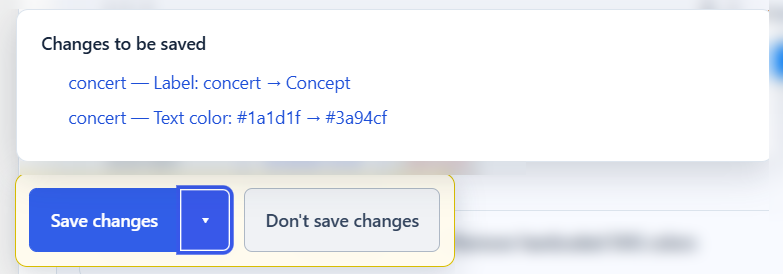
Save changes in BobWeb plugins

Deactivate your license

If you want to deactivate your license so you can use it on another site, you can do that at the bottom of the settings screen.

Deactivate the license for a BobWeb plugin so you can reuse it on another site

This plugin is available in the following languages

  • English
  • Nederlands
  • Deutsch
  • Français
  • Español
  • Italiano
  • Português
  • Polski
  • Dansk
  • Svenska
  • Norsk
  • Suomi
  • Čeština
  • Slovenčina
  • Magyar
  • Română
  • Ελληνικά
  • Türkçe
  • 日本語
  • 中文
  • One time payment

    no recurring costs, free updates

  • 30 days money back guarantee

    get a full refund if it's not for you

  • Great documentation

    video demo and written docs

Changelog

2.5.1 — 24-09-2026

  • BobWeb-licentieactivatie en versiecontrole toegevoegd. Licenties blijven geldig bij storingen of onbereikbaarheid van de licentieserver; alleen expliciet ongeldige of ingetrokken licenties worden geblokkeerd.

2.4.3

  • Routeknoppen alleen bij een kruisende route en een bestemming buiten ZE-zone; knoppen rood/groen per route. Korte groene melding als bestemming en routes buiten de zone liggen. Datum in meldingen dd-mm-jjjj.

2.4.1

  • Paneel staat standaard linksonder en kan via de header worden versleept; gekozen positie wordt bewaard en blijft binnen het venster.

2.4.0

  • Gebruik browsercoördinaten voor Mijn locatie, verwijder vast vertrekadres, voeg minimaliseren toe, verkort meldingen en voeg links toe om de berekende routes via tussenpunten in Google Maps te openen.

2.3.3

  • Gebruik en toon de vertrekplaats uit het geopende Google Maps-routeplan; ondersteun ook Maps-route-URL’s met origin- en destination-parameters. Het vaste vertrekadres is alleen een terugval bij Mijn locatie.

2.3.2

  • Verstuur Google Maps-coördinaten als Routes API locatiepunten, ook voor een vast vertrekpunt met coördinaten.

2.3.1

  • Toon de concrete foutmelding van Google Routes API bij HTTP 400; herken extra varianten van Mijn locatie.

2.3.0

  • RDW-kentekencheck, BobWeb-opmaak voor instellingen, expliciete DET-uitleg en automatische controle van een geopend routeplan via optionele Google Routes API-sleutel.

2.2.0

  • voertuiggegevens en bezoekdatum bepalen persoonlijke toegang op een bestemmingspunt.

Frequently Asked Questions

Yes, but don't expect huge new features every month. In fact, don't expect regular updates at all. These plugins are focused on one specific thing and do that really well, and as long as they keep working well there's probably no reason to update them.

As you can see in the changelog published on every plugin's detail page, most plugins get a lot of updates in the first few days and weeks after their initial release, because that's when I test them intensively and add and polish a lot of stuff. But once a plugin is how I want it, updates are rare.

However, if there is an update available, you can just update via the plugin overview screen, just like any other plugin.

There's a video demo and extensive documentation on the detail page for each plugin.

However, personal support is NOT included. For that price, I simply can't offer personal support (except for things like licensing problems).

That's why I offer a 30 days money back guarantee; if you can't get the plugin to work the way you want, I'll just refund you.

If you REALLY want support, or customization, you can buy a pre-paid credit bundle on my main website.

If the plugin isn't for you, you can get a refund within 30 days after you've purchased it.

Just fill in the form on this page, choose "refund" and provide the details asked (which plugin, your name and your e-mail address).

However, you should know the license will be revoked in that case, and the plugin will not work without a valid license.

Sure, you can absolutely do that too. But it took me many hours to get these plugins perfect & up to my standards, and I speak the language of web so I know how to explain exactly what I want to the AI ;-) Do you?

Moreover, these plugins are battle tested on real world websites, with many added features and fixes over time.

And at these one time prices, with free updates… I hope you value your time more than that ;-)